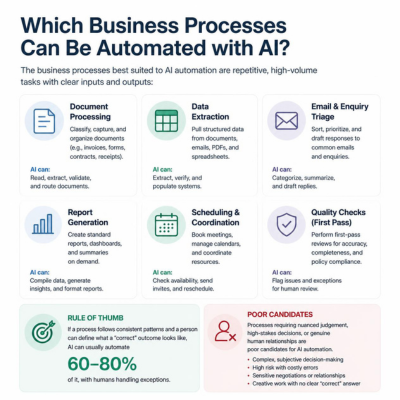
The business processes best suited to AI automation are repetitive, high-volume tasks with clear inputs and outputs: document processing, data extraction, email and enquiry triage, report generation, scheduling, and first-pass quality checks. As a rule of thumb, if a process follows consistent patterns and a person can define what a “correct” outcome looks like, AI can usually automate 60–80% of it, with humans handling exceptions. Processes requiring nuanced judgement, high-stakes decisions, or genuine human relationships are poor candidates.
That’s the short answer. The longer answer — and the one that determines whether your first AI project succeeds — is about how to identify those processes inside your own business. Here is the framework we use at Dee & Lee when we assess automation opportunities with clients.
Which business processes can be automated with AI? The five strongest categories
1. Document-heavy workflows. Invoices, contracts, applications, compliance paperwork. AI can read unstructured documents, extract the relevant fields, and route them — work that traditionally consumed hours of administrative time. This is the most common starting point we see, because the inputs are contained and the outputs are verifiable.
2. Communication triage. Customer enquiries, support tickets, inbound emails. AI can categorise, prioritise, draft responses for review, and escalate what needs a human. The human stays in the loop; the sorting disappears.
3. Data extraction and reporting. Pulling figures from multiple systems, reconciling them, and producing recurring reports. If someone in your business spends every Monday morning assembling the same report, that is an automation candidate.
4. Repetitive decision support. First-pass screening: which leads fit our criteria, which claims look standard, which applications are complete. AI makes the routine call; humans make the judgement call.
5. Content and assessment generation. Producing structured, rule-governed content at scale — product descriptions, test questions, summaries — with human review. We know this category first-hand: our own product, Abhivrddhi, uses AI to generate exam questions and analyse student performance for the education sector. What we learned building it applies broadly — generation is the easy half; the workflow around review and quality control is where the real design work sits.
What is the difference between AI automation and traditional automation?
Traditional automation follows explicit rules: if X, then Y. It works brilliantly for fully structured tasks and breaks the moment reality deviates from the rule. AI automation handles variation — it can read a document it hasn’t seen before, interpret an ambiguously worded email, or classify something based on patterns rather than exact matches.
The practical implication: if your process already runs on clean, structured data and fixed rules, you may not need AI at all — conventional automation is cheaper and more predictable. AI earns its cost where the inputs are messy, varied, or written in natural language.
How do I know if a specific process is a good candidate?
Run each process through five questions:
Is it frequent? Automating something that happens twice a year rarely pays back.
Can you describe it step by step? If your team can’t write the process down, AI can’t learn it reliably.
Are the inputs available digitally? Paper-only processes need digitisation first.
Can you define “correct”? You need a way to check the AI’s output, at least during the early months.
What happens when it’s wrong? If an error is cheap to catch and fix, automate confidently. If an error is costly or irreversible, keep a human in the loop — or don’t automate.
A process that passes all five is a strong candidate. A process that fails question 2 or 5 should wait.
What processes should NOT be automated with AI?
Be equally clear about the exclusions. Poor candidates include: decisions with legal or safety consequences where accountability must sit with a person; relationship-driven work such as negotiations and sensitive customer conversations; genuinely novel problem-solving; and any process your organisation doesn’t yet understand well. Automating a broken process gives you a faster broken process.
There is also a category we’d call “not yet” processes where the data exists but is scattered, inconsistent, or locked in legacy systems. These are future candidates — after a data clean-up, not before.
How do I start with AI automation without disrupting current operations?
Start with a shadow pilot: run the AI alongside the existing manual process for one workflow, compare outputs, and only switch over once the AI consistently matches or beats the human baseline. A well-scoped pilot of this kind typically takes 4–8 weeks and, using existing AI APIs rather than custom models, usually sits in the low five figures rather than the six-figure territory people fear .
For most SMEs, an API-based automation of a single process typically ranges from £4,000–£30,000 depending on integration complexity — far less than custom model development, which most businesses don’t need. (Gartner’s 2025 AI Adoption study suggests SME AI projects average £8,500–£25,000 for scoped pilots.) The bigger ongoing cost is usually workflow redesign and review time, not the AI itself. We’ve found that most clients see payback within 6–12 months on a single high-frequency process.
The sequencing that works: one process, one team, one measurable outcome. Prove it, document it, then expand. Organisation-wide transformation programmes fail far more often than narrow pilots — the evidence from our own client work and from building Abhivrddhi points the same way.
Frequently asked questions
How much does AI process automation cost? For most SMEs, an API-based automation of a single process typically ranges from a few thousand to a few tens of thousands of pounds depending on integration complexity — far less than custom model development, which most businesses don’t need. The bigger ongoing cost is usually workflow redesign and review time, not the AI itself.
For most SMEs, an API-based automation of a single process typically ranges from £4,000–£30,000 depending on integration complexity — far less than custom model development, which most businesses don’t need. [Gartner’s 2025 AI Adoption study suggests SME AI projects average £8,500–£25,000 for scoped pilots.] The bigger ongoing cost is usually workflow redesign and review time, not the AI itself. We’ve found that most clients see payback within 6–12 months on a single high-frequency process.
How long does an AI integration project take? A focused single-process automation typically takes 4–12 weeks from scoping to production, including a pilot phase. Timelines extend mainly when data needs cleaning or multiple legacy systems need connecting.
What data do I need before starting an AI project? You need digital access to the inputs the process uses (documents, emails, records) and enough historical examples to test against — often a few hundred, not millions. Perfect data is not required; representative data is.
Is AI automation worth it for a company with fewer than 50 employees? Yes, often more so than for large firms, because smaller companies feel repetitive admin proportionally harder. The key is choosing one high-frequency process rather than attempting broad transformation.
This will be something we can all relate to. Ourselves, family members, friends – many around us go through this process of finding a job. When it is a tough job market, it becomes more relevant.
As a technical professional, over the years I conducted many interviews. We once interviewed two candidates for a tech analyst role. Both had near-identical technical skills — great academic records, certifications in cloud and data analytics, and glowing recommendations.
But during the interview, one candidate did something subtle yet powerful.
When asked to describe a project, she didn’t just list technologies used. She said:
“Our model wasn’t performing well, so I reached out to the marketing team to understand how they were defining customer engagement. We realized our data labels were misaligned with business goals. Once we fixed that, our accuracy improved — but more importantly, the business started trusting the data again.”
That’s it. That’s the moment we knew she was different.
She demonstrated communication, collaboration, problem-solving, and empathy — the very soft skills that turn a technical solution into a business success story.
For decades, the tech world has been defined by hard skills — the ability to code, configure, debug, or deploy. But as the digital ecosystem matures, something unexpected is reshaping success in technology roles: soft skills are becoming just as critical as technical depth.
This shift isn’t just a HR cliché. It’s a business reality — one being lived out in boardrooms, product teams, and client meetings across the tech landscape.
Business Reality: When Tech Isn’t Enough
Take the example of a global software services firm working on a major digital transformation for a retail client.
The initial project team was technically brilliant — top engineers, cloud architects, data scientists. But communication gaps between technical and business teams delayed delivery. The engineers focused on optimizing system performance, while the client’s business team wanted better customer experience. Both sides were “right,” but they weren’t aligned.
The turnaround came when a project lead with strong communication and facilitation skills stepped in. She reframed technical discussions into business impact terms — connecting “improved API latency” to “faster checkout experience” and “higher customer retention.” Suddenly, the collaboration clicked. The same team, with the same tools, began delivering meaningful outcomes because someone bridged the human gap.
That’s the power of soft skills in a hard tech context.
The Tech Skills Are Table Stakes — Soft Skills Are the Differentiator
Most organizations today assume their teams already have strong technical foundations. What sets standout professionals apart is their ability to translate tech into value, influence stakeholders, and build trust.
In cloud projects, AI implementations, or data governance programs, companies increasingly look for people who can:
Communicate technical ideas clearly to non-technical audiences
Adapt to fast-changing technologies and still deliver under pressure
Show emotional intelligence when managing clients or leading diverse teams
A 2024 LinkedIn Workplace Learning Report noted that 92% of hiring managers consider soft skills “equal or more important” than technical skills — especially in hybrid and global work environments.
What Companies Are Actually Looking For
When employers look at student resumes, we know that hard skills can be learned, tools can be trained, and languages evolve. But the traits that make someone thrive in the workplace are different:
Communication – The ability to make complex ideas understandable.
Collaboration – Real-world tech problems are solved in teams, not silos.
Ownership – Students who take responsibility, not just tasks.
Empathy – Understanding end users, teammates, and business needs equally.
Lessons for Students & Aspiring Technologists
If you’re studying computer science, data analytics, or engineering, it’s easy to think your value lies in your technical stack — Python, TensorFlow, React, or Kubernetes. But here’s the truth: your career acceleration will depend on how you use those tools to solve human problems.
Here’s what you can start doing now:
Practice storytelling with data or code. Don’t just show what you built — explain why it matters and who it helps.
Engage in multidisciplinary projects. Work with design, business, or social science students — it builds empathy and broadens your perspective.
Build communication into your workflow. Whether writing a README file, documenting APIs, or giving presentations, clarity is a career superpower.
Seek feedback early and often. Emotional resilience and adaptability come from listening, iterating, and improving continuously.
Learn leadership even without the title. Volunteer to lead small group projects, mentor juniors, or handle client demos — all of which teach influence and accountability.
The Future: “Full-Stack Humans”
In the next decade, as AI and automation continue to handle more technical execution, the demand will rise for what we can call “full-stack humans.” Professionals who not only understand technology but also lead conversations, align strategies, and create human-centric outcomes.
In other words — the future isn’t just artificial intelligence. It’s human intelligence amplified by empathy and collaboration.
Closing Thoughts
In the “hard” world of tech, soft skills are becoming the hardest to master — and the most valuable to have. Those who blend both will not just survive the AI wave — they’ll lead it.
Operational excellence — the ability to deliver with speed, quality, and efficiency — is no longer about process optimization alone. It’s about how effectively an organization captures, governs, and leverages data. Increasingly, it’s also about how intelligence and automation are infused into daily operations to unlock agility and resilience.
In this post, we’ll explore how organizations can build operational excellence through a data-first approach.
Redefining Operational Excellence in the Age of Data
Traditionally, operational excellence was framed around lean processes, cost control, and continuous improvement frameworks. These remain important, but the definition has expanded.
Today, operational excellence means:
Running on trusted, real-time data instead of gut instinct
Embedding data-driven intelligence into decisions and workflows
Creating a data culture where teams can act on insights, not wait for reports
In short: Data is the foundation. Intelligence is the accelerator.
The Data Journey to Operational Excellence
Here’s the roadmap organizations can follow to build operational maturity:
1. Capture the Right Operational Data
You can’t optimize what you can’t measure. For most organizations, this means integrating:
ERP and supply chain data
CRM and customer experience data
IoT/sensor data from machines, warehouses, or logistics
Workforce and productivity data
Diverse, high-quality data is the starting point.
2. Elevate Data Governance & Quality
Governance isn’t bureaucracy — it’s the backbone of trustworthy insights.
Standardization ensures systems and analytics perform reliably
Without this, analytics and automation become liabilities rather than assets.
3. Integrate and Break Down Silos
Operational data is often scattered across functions. The goal is to connect the dots:
Data platforms that unify ERP, CRM, and IoT data
APIs that connect external and partner ecosystems
Data hubs or meshes that make data accessible across teams
When silos fall, cross-functional intelligence rises.
4. Apply Analytics for Insightful Decisions
Analytics is the bridge between data and action:
Descriptive analytics → “What happened?”
Diagnostic analytics → “Why did it happen?”
Predictive analytics → “What’s likely to happen next?”
Prescriptive analytics → “What should we do about it?”
Analytics should be seen not just as dashboards, but as a decision engine for the enterprise.
5. Infuse Automation & Intelligence
This is where operational excellence scales:
Predictive maintenance using IoT data
Demand forecasting to strengthen supply chain planning
Automated decisioning in logistics, scheduling, or workforce planning
Natural language tools that give every employee access to insights
The goal is to embed intelligence into the flow of work, not bolt it on afterward.
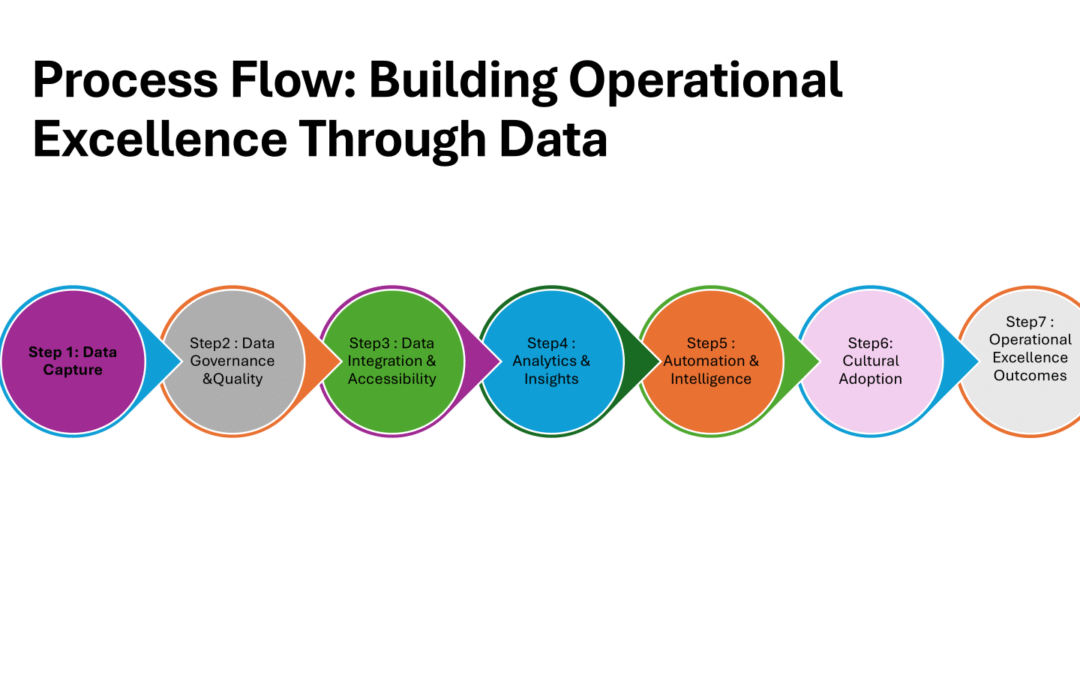
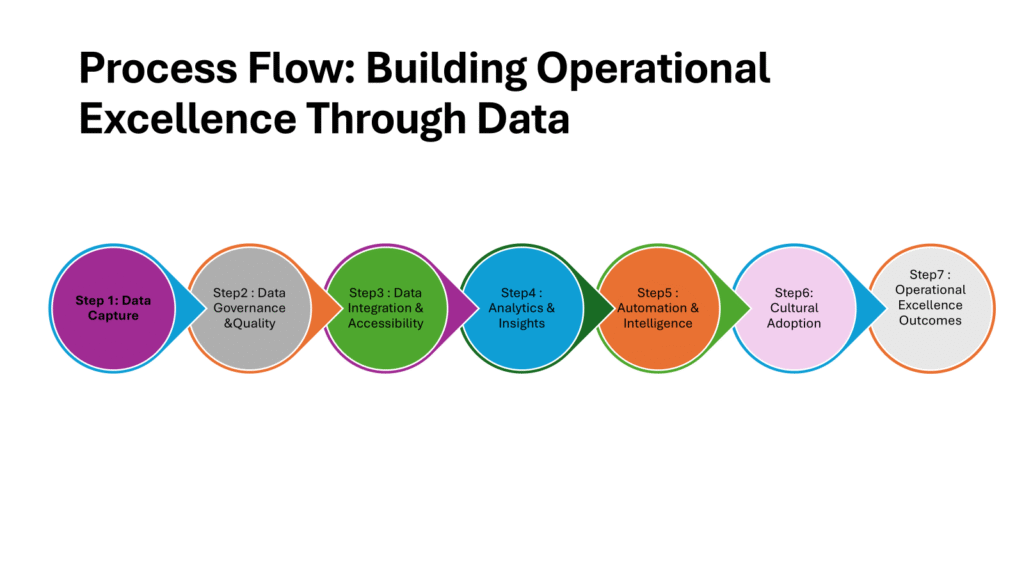
Step 1: Data Capture
Collect from ERP, CRM, IoT, workforce, external sources
Ensure completeness and relevance
Step 2: Data Governance & Quality
Standardize definitions
Apply compliance & privacy rules
Cleanse and validate data
Step 3: Data Integration & Accessibility
Connect siloed systems (ERP, CRM, IoT)
Use APIs, data hubs, or meshes
Enable enterprise-wide access
Step 4: Analytics & Insights
Descriptive (what happened)
Diagnostic (why it happened)
Predictive (what will happen)
Prescriptive (what should we do)
Step 5: Automation & Intelligence
Predictive maintenance
Demand forecasting
Automated decisioning
Self-service data tools
Step 6: Cultural Adoption
Data literacy across teams
Embed insights into workflows
Encourage trust & usage
Step 7: Operational Excellence Outcomes
Greater efficiency
Agility in response
Improved customer experience
Resilience & innovation
From Process to Practice
While the process flow lays out the technical journey of capturing, governing, and activating data, true operational excellence depends on how consistently these steps are practiced across the organization. A well-designed data architecture or analytics platform delivers little value if the insights don’t reach the right people, at the right time, in the right context. This is where the transition from systems and processes to people and culture becomes essential. Technology can streamline operations, but only a culture that values data-driven decision making ensures those improvements are sustained and scaled.
Building a Data-First Culture
Technology alone won’t deliver excellence. It’s about people and culture.
Leaders must champion data literacy at all levels.
Teams must feel empowered to use data in real-time decisions.
Success stories should be shared to reinforce a culture of trust in data.
As the saying goes: Data can’t replace judgment, but it can sharpen it.
Benefits of Data-Driven Operational Excellence
Organizations that take this journey see measurable results:
Efficiency → lower costs, less downtime, optimized resources
Agility → faster response to disruptions or opportunities
In today’s digital world, every industry runs on data. Whether it’s retail, healthcare, finance, education, or manufacturing, organizations are collecting massive amounts of information from customers, employees, devices, and markets. But raw data by itself is just noise. The real value comes from how businesses manage the data journey — the process of transforming raw inputs into insights and actions.
In this blog, we’ll explore the key datasets common across industries and walk through a generic data architecture that applies to any modern enterprise.
1. What Data Looks Like in Any Industry
Every sector may have its own flavor of data, but the categories are surprisingly universal:
a) Core Business Data
The heart of operations:
Customers, clients, or citizens
Products, services, or assets
Transactions (sales, claims, usage, bookings)
Operational data (supply chain, logistics, manufacturing steps)
b) People & Workforce Data
Every organization runs on people:
Employees, contractors, partners
Skills, performance, training, and payroll
c) Financial & Compliance Data
The foundation for accountability:
Revenue, expenses, P&L statements
Billing, invoicing, and pricing
Audit and regulatory data
d) External & Contextual Data
The outside world adds context:
Market and competitor data
Economic indicators
Weather, IoT sensors, or geospatial data
Social media, customer feedback, public datasets
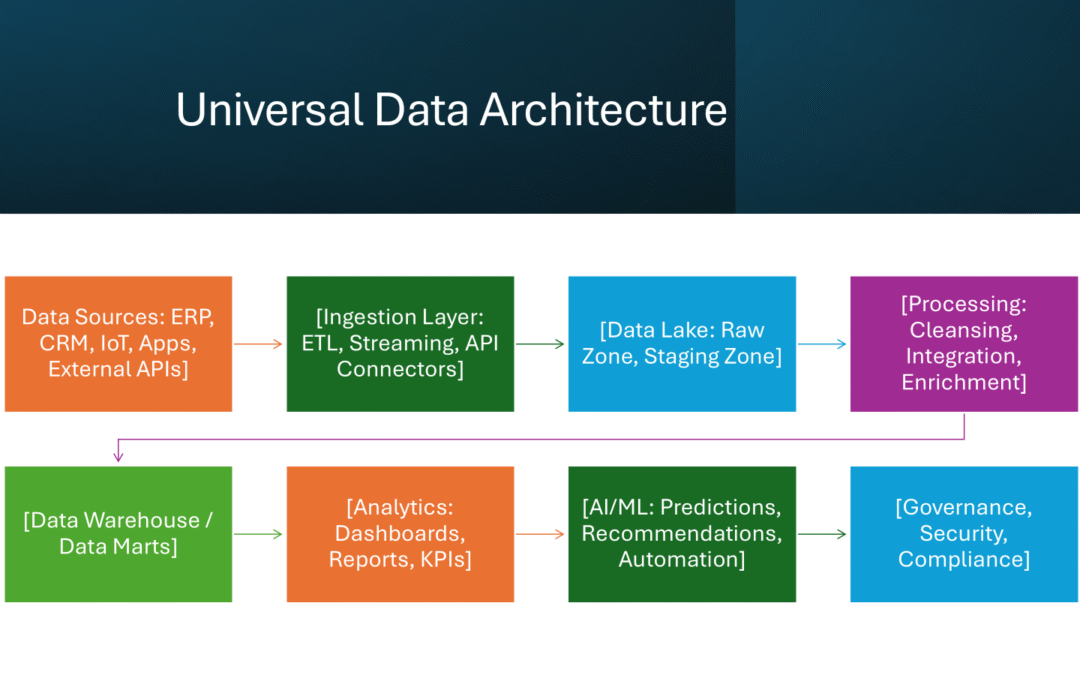
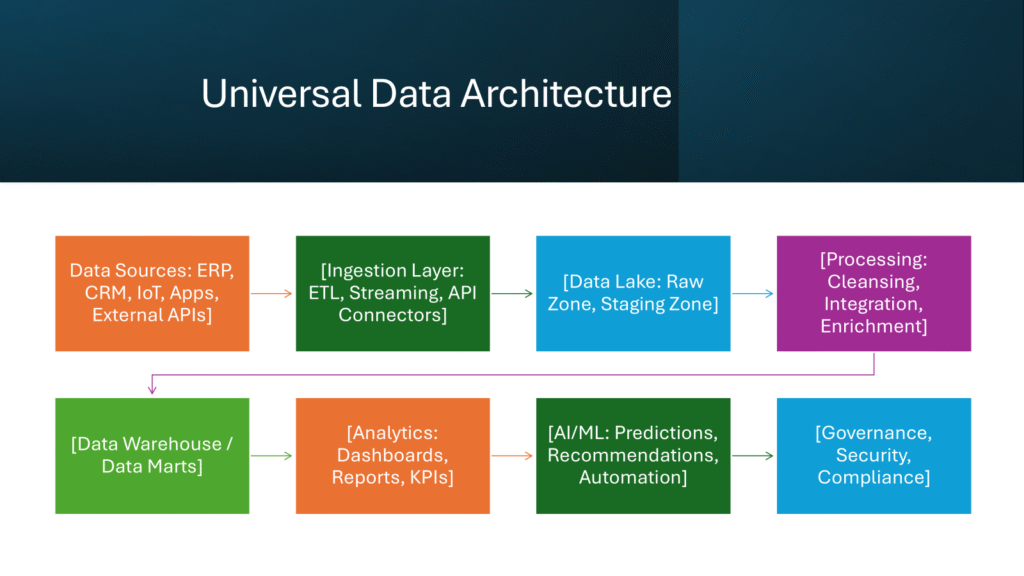
2. The Data Journey: From Raw Inputs to Intelligent Outcomes
Here’s how the data lifecycle typically flows in any enterprise:
Step 1: Data Sources
Enterprise systems (ERP, CRM, HR, SCM), websites, apps, IoT devices, and external APIs feed data into the ecosystem.
Step 2: Data Ingestion
Data enters the architecture via:
Batch ETL (daily/weekly jobs)
Streaming ingestion (real-time events like clickstream or IoT signals)
APIs and integrations with external partners or SaaS tools
Step 3: Data Lake (Raw Zone)
A central landing zone for all raw data, flexible enough to handle structured, semi-structured, and unstructured formats.
Step 4: Processing & Transformation
Data is cleaned, standardized, and enriched. This step integrates data across silos (ERP + CRM + external feeds) to create a single version of the truth.
Step 5: Data Warehouse & Data Marts
Curated datasets are stored in structured formats optimized for reporting and analytics. Think of this as the “organized library” compared to the messy storage room of the raw data lake.
Step 6: Analytics & Business Intelligence
Dashboards, KPIs, and reports provide descriptive and diagnostic insights. Business users can monitor performance and make data-driven decisions.
Step 7: Advanced Analytics & AI
Predictive and prescriptive analytics unlock higher value:
Demand forecasting
Customer churn prediction
Recommendation engines
Risk scoring and automation
Step 8: Governance, Privacy & Security
No journey is complete without rules. Data governance ensures quality, ownership, and compliance (GDPR, HIPAA, industry standards). Security measures protect sensitive information.
Step 9: Data Sharing & APIs
Finally, data is made useful across the ecosystem: partners, regulators, marketplaces, or customers via secure APIs.
3. A Universal Data Architecture
Here’s the big picture of how it all fits together:
4. Why This Matters
By following this data journey, organizations can:
Break down silos between departments
Improve decision-making with real-time insights
Enhance customer and employee experiences
Ensure compliance and trust
Build scalable AI-driven capabilities
No matter the industry, the path from raw data to business value is the same. What differs is the domain-specific context — whether you’re analyzing patient outcomes, optimizing a supply chain, or predicting student success.
✅ Key takeaway: Data is no longer a by-product of business — it is the business. Companies that master the data journey are the ones that stay competitive, innovative, and future-ready.